Connect an OTel Collector to FleetAMP with OpAMP
This guide shows the first verified FleetAMP integration path: an OpenTelemetry Collector gateway running in Kubernetes connects to FleetAMP over OpAMP.
Architecture
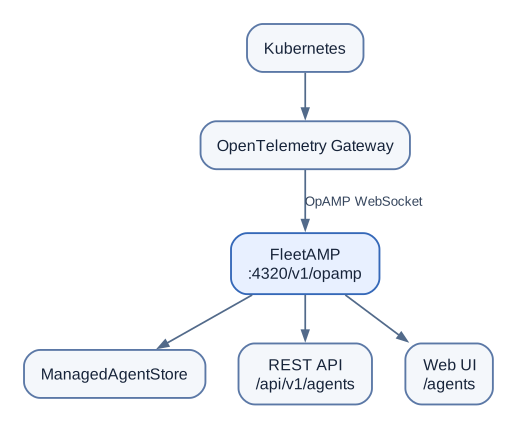
The telemetry path remains independent. OTLP receivers, processors and exporters continue to send telemetry to the configured observability backend.
Collector OpAMP extension
Add the OpAMP extension to the Collector configuration:
extensions:
  opamp:
    # Generate one UUID once for this logical Collector and keep it stable.
    # Never share an InstanceUID between simultaneously running replicas.
    instance_uid: 01a06e16-1263-7b42-af6f-b85c265588c5
    server:
      ws:
        endpoint: ws://host.docker.internal:4320/v1/opamp
Enable useful reporting capabilities and descriptive metadata:
    capabilities:
      reports_effective_config: true
      reports_health: true
      reports_available_components: true
      accepts_restart_command: false

    agent_description:
      non_identifying_attributes:
        fleetamp.agent.id: otel-gateway-personal-lab
        collector.role: gateway
        cluster.name: docker-desktop
        deployment.environment: personal-lab
        team: payments
        environment: prod
        application: payment-api

service:
  extensions: [opamp]
host.docker.internal is appropriate for the verified Docker Desktop Kubernetes lab because FleetAMP runs on the host machine. Other Kubernetes environments need a routable FleetAMP address appropriate for that environment.
The values under agent_description.non_identifying_attributes are reported metadata. FleetAMP displays them under Reported OTel attributes, and they can satisfy group selectors automatically. FleetAMP-managed labels remain a separate operator-owned override layer.
Verify the connection
After applying the Collector configuration, open:
http://localhost:8080/agents
or query the REST API:
curl http://localhost:8080/api/v1/agents
A connected gateway should report information such as:
Type        otel_collector
Version     0.149.0
Connected   true
Healthy     true
Runtime     kubernetes
Cluster     docker-desktop
Role        gateway
Environment personal-lab
FleetAMP requests full OpAMP state after connection so the Collector can report its description, health and effective state. Click the Collector name in /agents to open its details page.
For the direct Collector extension used in this lab, reports_effective_config indicates that the Collector can report effective configuration state. It does not imply that it accepts remote configuration from FleetAMP. If no effective configuration body has been received yet, the detail page explicitly says so.
If you create and assign a FleetAMP configuration to this direct-connected Collector, the expected status is unsupported when accepts_remote_config is not advertised. Use the OpAMP Supervisor when FleetAMP needs to remotely manage Collector configuration.
Security
The example uses plain ws:// only for a local development lab. Production deployments should use TLS (wss://), authentication/authorization, and controlled network exposure.
Connect from another system
If FleetAMP runs on a different server, replace host.docker.internal with a DNS name or IP address that the Collector can reach. For example, if the FleetAMP server is 10.10.20.50:
extensions:
  opamp:
    server:
      ws:
        endpoint: ws://10.10.20.50:4320/v1/opamp

service:
  extensions: [opamp]
The management path is therefore:
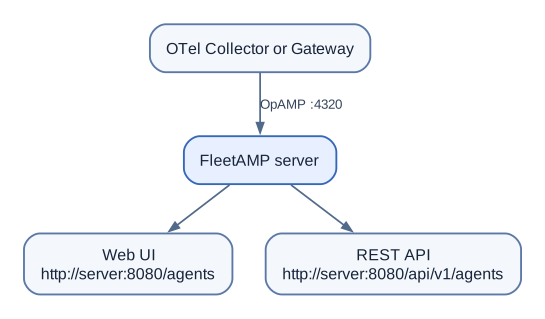
The Collector initiates the OpAMP connection; FleetAMP does not need to connect into the Collector host or Kubernetes pod. Make sure firewalls, security groups, Kubernetes networking, or load balancers allow the Collector to reach the FleetAMP OpAMP listener.
After the Collector connects, verify it from the FleetAMP server:
curl http://localhost:8080/api/v1/agents
Or browse from another permitted workstation to:
http://<fleetamp-server>:8080/agents
Restart-safe agent identity
The direct Collector extension and the OpAMP Supervisor preserve identity differently:
- Direct Collector extension: configure one fixed
instance_uidfor the logical Collector, as shown above. Generate it once and keep it in deployment configuration. Never reuse it for another running replica. - OpAMP Supervisor: mount
/var/lib/otel-supervisorfrom a PersistentVolumeClaim rather thanemptyDir. The Supervisor stores and restores its generated InstanceUID there.
For both models, report a unique logical identity using fleetamp.agent.id. This is a guarded recovery mechanism: when a new InstanceUID reports the same stable ID as exactly one disconnected or retired agent, FleetAMP carries the prior managed group identity and labels forward. FleetAMP refuses active or ambiguous matches and never guesses from pod names, hostnames, or generic service names.
The complete Supervisor PVC and deployment-patch examples are in deploy/lab/opamp-supervisor/ in the FleetAMP runtime repository. For production, use TLS/WSS, authentication, authorization, and hardened network exposure.
Manage the Gateway through the OpAMP Supervisor
Remote configuration requires the Supervisor model rather than the direct Collector opamp extension. The verified lab architecture is:
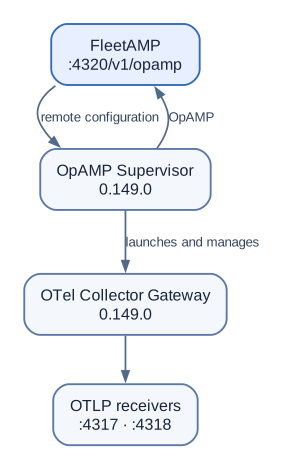
The Supervisor advertises accepts_remote_config, injects the Collector-side OpAMP extension, merges the local base configuration with FleetAMP remote configuration, restarts the Collector when required, and reports remote-config status and effective configuration back to FleetAMP.
A repeatable lab example is included under deploy/lab/opamp-supervisor/. Keep backend credentials out of the repository; use Kubernetes Secrets or environment-specific configuration for real exporters.
Verified result
A FleetAMP test configuration was assigned to the Supervisor-managed Gateway and progressed through:
sent -> applying -> applied
The Agent Details page then displayed the desired artifact and the effective configuration reported back through OpAMP.